允许多个用户同时通过 Windows 远程桌面登录
允许多个用户同时通过 Windows 远程桌面登录
Category: DevOps
本指南旨在通过配置 Windows 远程桌面服务(Remote Desktop Services, RDS),实现多个用户同时远程登录服务器。
🧩 Instructions
✅ 安装 Remote Desktop Services(RDS)
-
打开 Server Manager,在 Remote Desktop Services 中安装以下 3 个角色:
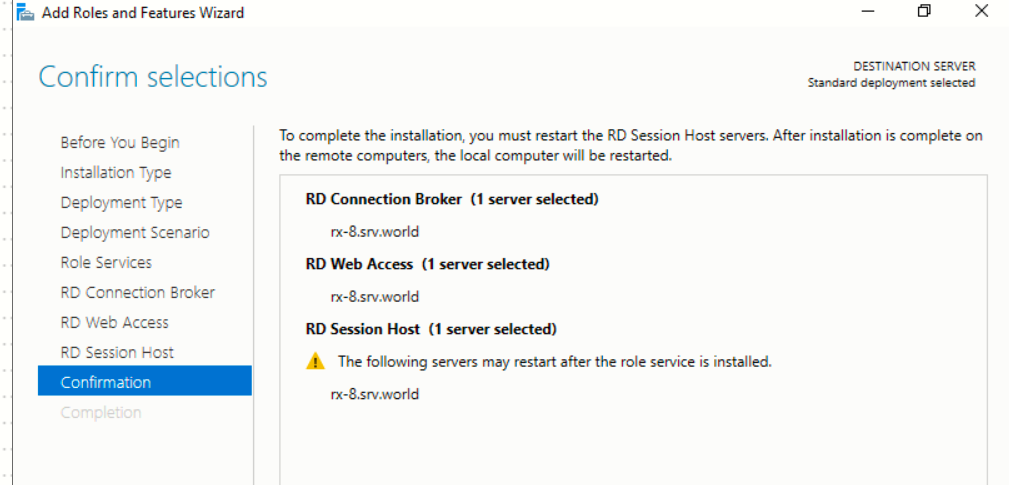
-
安装完成后,重启系统。
-
初始的 宽限期(Grace Period) 为 120 天,可视作试用时间。
🛠️ 在宽限期内重置 Grace Period
- 使用 Reset Grace Period.ps1 脚本(来自 GitHub 仓库 [Prakash82x/PowerShell])恢复 RDS 的宽限期至 120 天。
- 执行脚本后,重启系统以使配置生效。
⏰ 设置计划任务定期重置
- 为避免手动操作,可在 Windows 任务计划程序 中创建定期任务,约每 90 天运行一次重置脚本:
- 创建的任务可调用如下
bat脚本来执行:powershell C:\scripts\Reset-TSGracePeriod.ps1 -Force shutdown -r -f -t 300
评论
其他文章